---
title: Collections
description: Collections is a feature that allows you to promote seasonal or editorial collections of your shop or brand on GLAMI. Collections are presented as a separate landing page in GLAMI catalogue accessible
---
[Skip to content](https://help.glami.info/collections#main-content)
- [English](https://help.glami.info/collections)
- [Italiano](https://help.glami.info/it/collections)
- [Magyar](https://help.glami.info/hu/kollekciók)
- [Polski](https://help.glami.info/pl/collections)
- [Български](https://help.glami.info/bg/kolekcii)
English
Show submenu for translations
![2-4.png\]](https://help.glami.info/hs-fs/hubfs/2-4.png?height=40&name=2-4.png)
Open main navigation
Close main navigation
- - [English](https://help.glami.info/collections)
- [Italiano](https://help.glami.info/it/collections)
- [Magyar](https://help.glami.info/hu/kollekciók)
- [Polski](https://help.glami.info/pl/collections)
- [Български](https://help.glami.info/bg/kolekcii)
English
Show submenu for translations
- Go to glami.cz
Go to glami.cz
Hello. How can we help you?
- There are no suggestions because the search field is empty.
1. [Help Center](https://help.glami.info/?hsLang=en)
2. [GLAMI features](https://help.glami.info/glami-features?hsLang=en)
3. [Additional promotions](https://help.glami.info/glami-features?hsLang=en#additional-promotions)
# Collections
### What are collections?
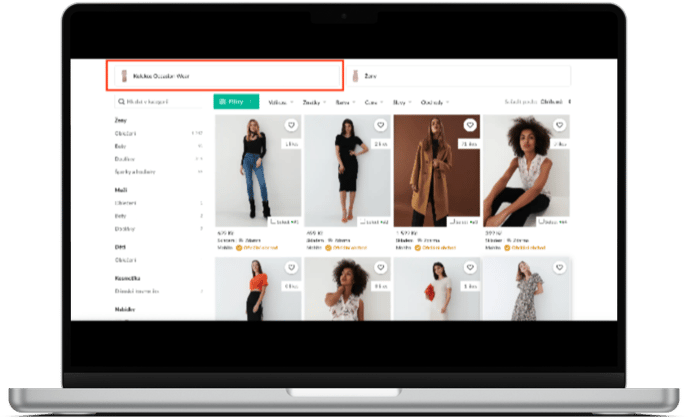
Collections is a feature that allows you to **promote seasonal or editorial collections** of your shop or brand on GLAMI. Collections are presented as a separate landing page in GLAMI catalogue accessible from your shop or brand page. This landing page can be used as a destination in a number of marketing placements on GLAMI or within GLAMI social media profiles. If you are interested in this type of promotion, please contact your account manager.
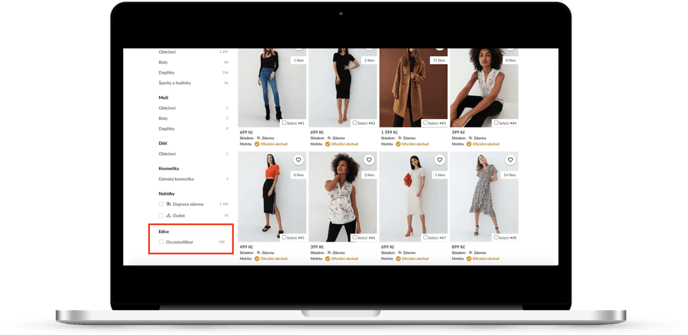
All you need to do is tag relevant products in the xml feed and contact your account manager, we will take care of the rest.
### How can I create a collection?
Creating a collection is easy. All you need to do is tag relevant products in the XML feed. Please make sure to add the following parameters to the products in your feed which should belong to a certain collection:
**\**
**\Collection launch month\**
**\MM/YYYY\**
**\**
**\**
**\Collection name\**
**\Name of your collection\**
**\**
**Collection launch** month is the month in which the collection was launched. Please adjust the date in **\** parameter, so that it includes the date information.
**Collection name** is the name of your collection. This name also defines the name under which your collection will appear in the GLAMI catalogue.
### **Example:**
In case you want to add a collection named **“Sportswear Summer 2022”** that was launched in 06/2022, you would add the following parameters to each relevant item in your xml feed:
**\**
**\Collection launch month\**
**\06/2022\**
**\**
**\**
**\Collection name\**
**\Sportswear Summer 2022\**
**\**
Once this information is added to your XML feed, please contact your account manager. We will double check the information and activate the collection in the GLAMI catalogue.
### Can collections be promoted?
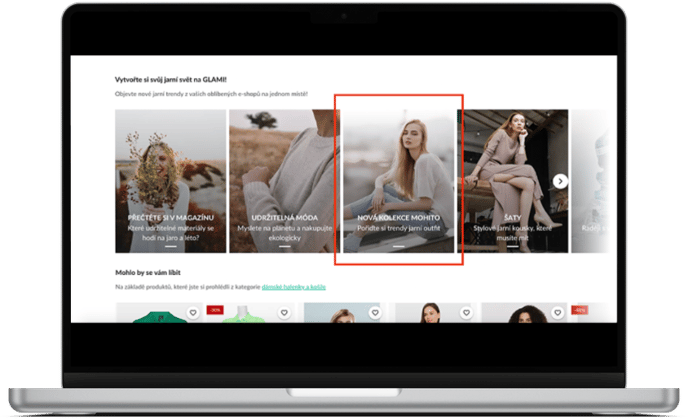
Yes, the landing page of your collection can be promoted on certain placements within GLAMI catalogue (homepage & trending tiles of your shop / brand page) and GLAMI social media profiles (facebook, instagram, email newsletter). If you are interested in this type of promotion, please contact your account manager.
- [GLAMI General Information](https://help.glami.info/glami-general-information?hsLang=en#main-content)
- [Sign up on GLAMI](https://help.glami.info/glami-general-information?hsLang=en#sign-up-on-glami)
- [Information for newly registered shops](https://help.glami.info/glami-general-information?hsLang=en#information-for-newly-registered-shops)
- [Additional information](https://help.glami.info/glami-general-information?hsLang=en#additional-information)
- [XML feed](https://help.glami.info/xml-feed?hsLang=en#main-content)
- [XML feed: Mandatory parameters](https://help.glami.info/xml-feed?hsLang=en#xml-feed-mandatory-parameters)
- [XML feed: Recommended parameters](https://help.glami.info/xml-feed?hsLang=en#xml-feed-recommended-parameters)
- [Billing and Payments](https://help.glami.info/billing-and-payments?hsLang=en#main-content)
- [CPC business model](https://help.glami.info/billing-and-payments?hsLang=en#cpc-business-model)
- [GLAMI order tracking (Pixel, Google Analytics)](https://help.glami.info/glami-order-tracking-pixel-google-analytics?hsLang=en#main-content)
- [Helpful guides](https://help.glami.info/glami-order-tracking-pixel-google-analytics?hsLang=en#helpful-guides)
- [GA4](https://help.glami.info/glami-order-tracking-pixel-google-analytics?hsLang=en#ga4)
- [GLAMI Pixel and new cookie legislation](https://help.glami.info/glami-order-tracking-pixel-google-analytics?hsLang=en#glami-pixel-and-new-cookie-legislation)
- [Performance](https://help.glami.info/performance?hsLang=en#main-content)
- [Optimization](https://help.glami.info/performance?hsLang=en#optimization)
- [Discount codes and GLAMIDAYS](https://help.glami.info/performance?hsLang=en#discount-codes-and-glamidays)
- [GLAMI features](https://help.glami.info/glami-features?hsLang=en#main-content)
- [GLAMI Audiences](https://help.glami.info/glami-features?hsLang=en#glami-audiences)
- [Additional promotions](https://help.glami.info/glami-features?hsLang=en#additional-promotions)
- [GLAMI TOP](https://help.glami.info/glami-features?hsLang=en#glami-top)
[](http://glami.cz)
Copyright © 2026, GLAMI, Inspigroup, s.r.o.